Work orders that stay useful
Schedule jobs, group multiple repairs or assets on one work order, edit parts, capture signatures, and keep reported issues, completed work, and internal notes in one durable record.
Desktop service management / built for the road and the shop
MobileTech Service Desk is local-first Windows and macOS software for owner-operators and very small independent repair businesses. Manage customers, vehicles or equipment, service work, parts, quotes, invoices, expenses, follow-ups, and operational reports.
Private by default. Your operating records remain on your computer.
Useful offline. Keep servicing when the connection is not.
Built for one workstation. A focused desktop workflow without multi-user cloud complexity.
One operational record
Replace scattered sheets, paper folders, and disconnected reminders with a workflow that remembers the whole service relationship.
Schedule jobs, group multiple repairs or assets on one work order, edit parts, capture signatures, and keep reported issues, completed work, and internal notes in one durable record.
Build repair options with separate approval decisions, use Quick Invoice for one-time customers, carry accepted work into a work order, and record invoice payment status and method.
See quantities, costs, selling prices, bin locations, vendors, and low-stock alerts before the next field call or shop repair.
Keep contacts, billing details, vehicles, equipment, meter readings, service intervals, and summarized repair history connected in compact expandable records.
Record expenses by date, category, vendor, amount, and payment method so operating costs stay connected to the business.
Review revenue, parts cost and profit, expenses, open balances, service activity, and month-end estimates, then print or export report data.
What is current in 1.0.17
Released September 12, 2026, the current MobileTech build adds a faster path for one-time work, broader language support, adjustable scheduling, cleaner record lists, and current setup documentation.
Create a streamlined invoice for a one-time customer, or schedule a guest appointment before deciding whether the customer should become a permanent record.
Use English, Spanish, French, Portuguese, German, Russian, Italian, Dutch, or Polish throughout the app and on printed customer documents.
Set the dashboard schedule start and end times, limit how far technicians can schedule themselves, and create appointments for saved or one-time customers.
Choose Equipment or Vehicle, Hours or Miles, and Serial Number or VIN. Vehicle mode also adds the vehicle Year field.
Customers, work orders, quotes, inventory, expenses, potential customers, and CRM activity use compact expandable lists that keep more records in view.
Use reliable backup restore, retain read-only and export access when a subscription is inactive, check for updates in Settings, and follow the new visual Quick Setup Guide.
See MobileTech in action
Explore real application screens built around the work independent technicians handle in the shop and on the road every day.
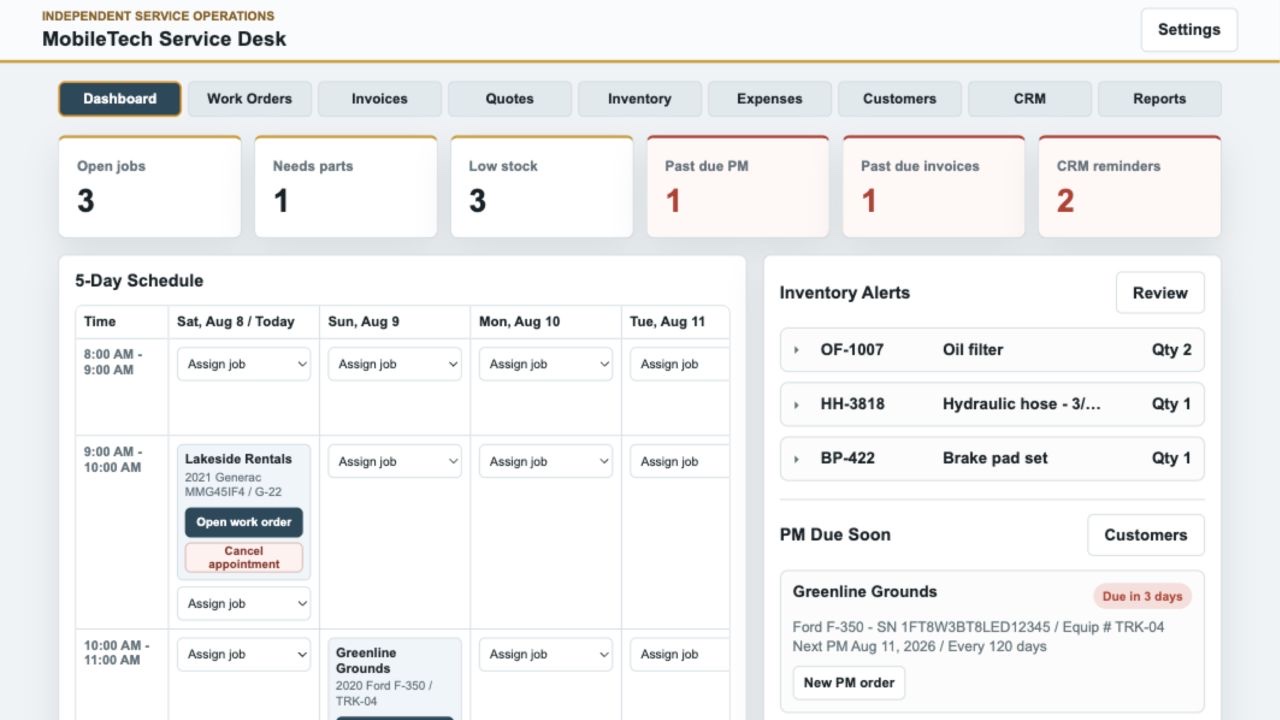
See the five-day schedule, open jobs, parts shortages, low-stock items, past-due PM, past-due invoices, and CRM reminders from one practical starting point.
Your trade. Your workflow.
MobileTech supports mobile routes, shop-based repair, and businesses that do both. It is built around service records, customers, parts, scheduling, invoicing, and payment tracking—not around one location or asset category.
Independent repair, mobile mechanics, specialty vehicles, and small commercial fleets.
Compact equipment, landscaping machinery, rental assets, and jobsite service.
Tractors, implements, mowers, utility vehicles, and small engines.
Generators, compressors, pumps, welders, and other essential machinery.
Boats, RVs, trailers, powersports, and specialty service work.
Build a repeatable service history around the vehicles and equipment your customers depend on.
Who MobileTech is for
MobileTech combines the everyday service record and business workflow an owner-operator needs without pretending to be an enterprise dispatch, accounting, or fleet platform.
A strong fit for an independent technician who performs the work and manages the customer, paperwork, parts, and follow-up from one primary computer.
Useful for a small operation with a shared office or shop computer and a straightforward workflow—not a multi-location dispatch organization.
Choose vehicle or equipment terminology, miles or hours, and VIN or serial-number labels to match the assets you actually service.
Designed for shops and field technicians who want records available on their own Windows PC or Mac without a required operational cloud account.
MobileTech is a desktop recordkeeping and workflow application. It does not include an iPhone or Android app, shared multi-user cloud synchronization, payroll or full accounting, or built-in payment processing for your repair invoices. It records invoice totals, payment status, and payment method so you can keep the service history complete.
A cleaner service day
From a shop bay to a customer site, MobileTech is organized around the way service actually moves—not around a generic software dashboard.
Put the customer, vehicle or equipment, reported issue, and service window on the board.
Record labor, parts, inspections, notes, meter readings, and signatures.
Finish the invoice, record payment status, update inventory, retain the history, and plan what comes next.
Local-first by design
The standard desktop application stores operational data in a private SQLite database on your computer. It does not require a vendor cloud account, sell customer information, or depend on advertising trackers.
Read the privacy approach →Records stay available on the computer doing the work.
Daily local backups help protect the service history you rely on.
Manual JSON backups make recovery and migration practical.
7 days free · then $29.99 monthly
Start with seven days of full access. A payment method is required; cancel before the trial ends to avoid the first charge. Each subscription activates one computer and refreshes securely in the background.
Built for independent field and shop technicians
MobileTech gets better through feedback from the technicians who use it. If a workflow, report, or small detail could work better for your business, send your suggestion to support@mobiletsd.com. We read every idea and use customer feedback to help guide future improvements.